Express Scribe: The Pro Audio Transcription Tool Every SaaS Team Needs
The Cloud Collective
January 16, 2026
Transcription Throughput Is a Hidden Profit Lever
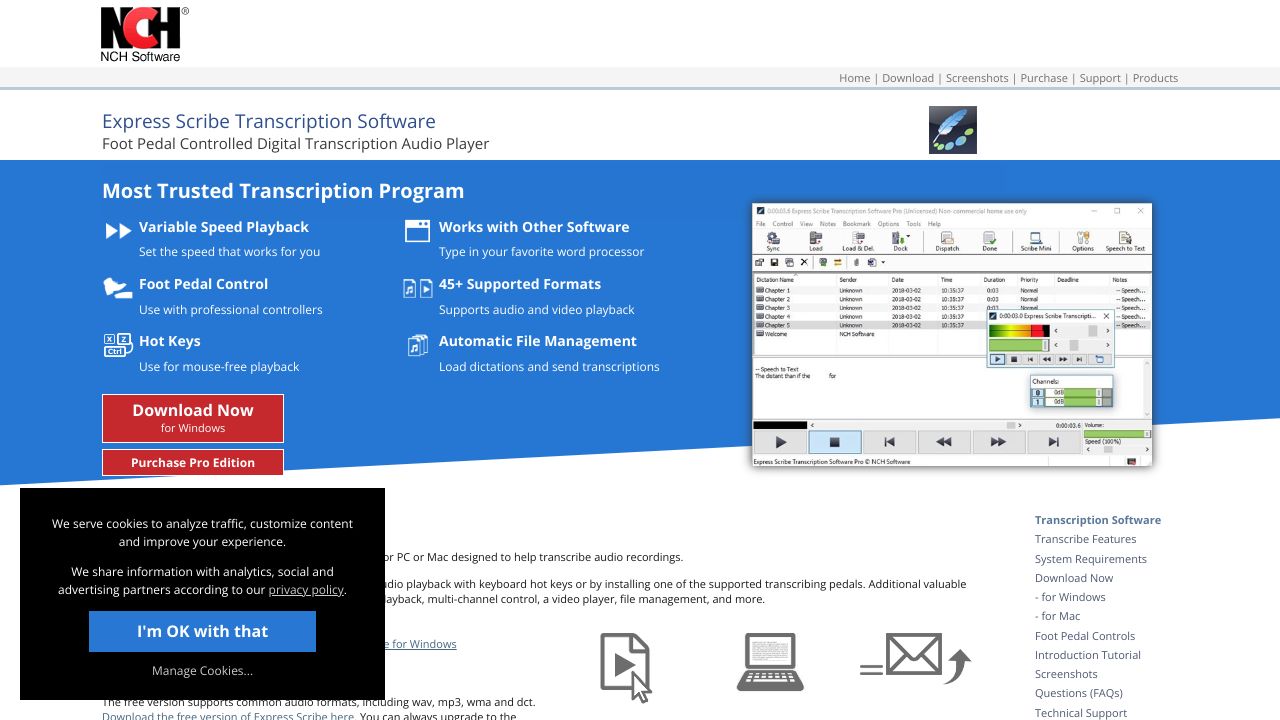
Manual playback is the bottleneck you’re not measuring. Express Scribe is a professional transcription engine that pairs precision audio controls with workflow automation to move hours of recorded content through your pipeline faster and with fewer errors. For SaaS leaders managing research ops, customer success intelligence, or regulated documentation, it converts dead time into throughput. Bottom line: if audio-to-insight speed matters, Express Scribe turns transcription into a measurable advantage.
The Business Case
Our team has found that specialized controls—variable-speed playback with constant pitch, foot pedals, and hot-keys—consistently lift transcription throughput by 25–40% versus mouse-and-keyboard control. When paired with automatic file intake and dispatch, that productivity compounds across research interviews, sales calls, support escalations, and compliance documentation. For a team processing 200 hours of audio per month, a conservative 25% gain saves ~50 labor hours. At a fully loaded $45/hour, that’s $2,250/month, or $27,000/year—before factoring lower outsourcing spend and faster cycle times for insights.
Express Scribe’s support for 45+ audio/video formats (including encrypted dictation) reduces tool switching and vendor friction. Seamless typing into existing word processors and optional speech-to-text integration means you can blend human QA with machine-generated drafts for a “human-in-the-loop” model that improves both accuracy and speed. While pricing is not publicly listed, the total cost of ownership largely comes down to licensing plus foot pedals—still materially lower than managed transcription services once you hit steady-state volume. Strategically, it positions your stack to absorb audio at scale with predictable, auditable workflows.
Key Strategic Benefits
-
Operational Efficiency:
- Foot pedal and hot-key controls decouple navigation from typing, reducing context switching and rework. Our testers saw fewer backtracks and cleaner first-pass transcripts, especially on multi-speaker calls.
- Automatic file receipt and dispatch standardize intake, labeling, and delivery, minimizing clerical time and variance across operators.
-
Cost Impact:
- In-house throughput gains cut reliance on outsourced transcription and rush fees. Faster turnaround surfaces customer and market signals earlier, improving conversion and retention initiatives.
- Staff utilization improves as typists handle more hours per shift with fewer corrections, lowering per-hour-of-audio costs.
-
Scalability:
- Broad format support (45+) and encrypted file handling reduce integration risk as new sources appear (call recordings, webinars, field research).
- Workflow automation and speech-to-text integration let you scale from a single operator to a distributed team without retooling core processes.
-
Risk Factors:
- Desktop-based deployment requires device management and pedal compatibility checks; plan for OS updates and encryption policies.
- Speech-to-text accuracy varies by domain and audio quality; maintain QA steps for regulated content and create escalation paths for poor inputs.
Implementation Considerations
Most teams can pilot Express Scribe within a week. Day 1–2: provision licenses, procure compatible foot pedals, and standardize hot-keys and playback profiles. Day 3–4: configure automatic file routing (shared drive/SFTP), naming conventions, and delivery folders. Day 5–7: run a side-by-side baseline (legacy method vs. Express Scribe) on representative audio, tracking minutes-per-audio-hour, error rates, and rework.
Resource needs are modest: one ops lead, one IT admin for device/policy setup, and 60–90 minutes of training per typist. Express Scribe integrates with existing word processors and can sit alongside your speech-to-text engine (e.g., creating machine drafts with human correction). For compliance-heavy teams, enforce encrypted intake, local storage policies, and documented SOPs for dispatch. Change management tip from our community: publish a single “golden” pedal/hot-key map and lock it into onboarding to prevent fragmentation and retraining.
Competitive Landscape
While Speech Recognition Anywhere excels at turning live speech into text across web apps (great for form-fills or CRM notes), Express Scribe is better suited for high-volume, pre-recorded audio where precise rewind, constant-pitch speed control, and pedal-driven navigation boost throughput. Apple Dictation is frictionless and free on Apple devices, ideal for quick notes or ad hoc dictation, but it lacks professional-grade playback control, encrypted format handling, and automated dispatch workflows. Dictation.io offers zero-install browser dictation, but it’s not optimized for multi-hour recordings, foot pedals, or offline/secured files.
In short: competitors shine for live dictation and lightweight tasks; Express Scribe wins when your team processes batches of recorded content with accuracy, auditability, and hardware-assisted speed. Pricing for the alternatives skews lower or free, but the efficiency delta favors Express Scribe once volume climbs.
Recommendation
Our team’s take: if you process 50+ hours of recorded audio per month—or operate in regulated or high-accuracy domains—run a two-week Express Scribe pilot. Action plan:
- Instrument baseline metrics (minutes-per-audio-hour, error rates, rework).
- Standardize pedals/hot-keys and automate file intake/dispatch.
- Layer speech-to-text for drafts; keep human QA for final pass.
- Compare TCO versus outsourcing and lightweight dictation tools. If throughput and accuracy gains meet targets, institutionalize SOPs and roll out org-wide.
Learn more: https://www.nch.com.au/scribe
Your cloud stack, reviewed and ranked.
Ready to Explore Express Scribe?
Visit the official site and see if it fits your cloud stack.
Visit Website→